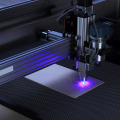
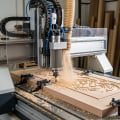
Are you ready to unlock the creative potential of your very own laser engraver? Whether you're a hobbyist looking to personalize gifts or a business owner aiming to create intricate designs, setting up a laser engraver can be an exciting journey. However, the initial setup process can seem daunting, especially if you’re new to this innovative technology. Fear not! In this article, we will guide you through the essential steps to ensure that your laser engraver is up and running smoothly. Imagine the satisfaction of watching your ideas come to life as the laser etches beautiful patterns onto wood, acrylic, or even metal. But before you can dive into your projects, it’s crucial to get familiar with your machine and understand its capabilities.
From unpacking the equipment to configuring software settings, we will cover everything you need to know. So, whether you're starting from scratch or looking to refine your setup process, join us as we explore the world of laser engraving. Your path to crafting stunning designs starts here!Setting up a laser engraver can be an exciting venture for both hobbyists and professionals looking to explore the world of engraving. The first step in this journey is to select the right machine. Consider your specific needs, such as the materials you plan to work with, the size of the projects you envision, and your budget.
Laser engravers vary widely in capabilities, so ensuring compatibility with materials like wood, metal, glass, and acrylic is crucial. Once you have chosen your machine, it's time to unbox it. Carefully remove the components and check for any damage during shipping. Refer to the manufacturer’s manual for a detailed list of parts and ensure everything is accounted for. After unboxing, you need to set up the laser engraver in a suitable workspace.
Choose a well-ventilated area with adequate lighting and ample space to maneuver around the machine. It’s also important to have a sturdy table or workbench that can support the weight of the engraver. Next, connect the engraver to your computer using the provided USB cable or other connectivity options as specified by the manufacturer. This step may require installing any necessary drivers that allow your computer to communicate effectively with the engraver. Follow the installation instructions carefully; many manufacturers provide software that simplifies this process. After establishing a connection, focus on software installation and configuration.
Most laser engravers come with their own design software or are compatible with popular design programs such as Adobe Illustrator or CorelDRAW. Make sure to install any specific drivers or plugins required for your machine to function correctly within these programs. Preparing designs for engraving is a critical part of the setup process. Familiarize yourself with accepted file formats like SVG, DXF, or BMP that are compatible with your engraver's software. When creating designs, consider starting with simple patterns or text to build confidence before progressing to more complex images. Once your design is ready, you'll need to adjust settings such as power, speed, and focus based on the materials you are working with.
For example, engraving on wood typically requires different settings than engraving on metal or glass. Consult your machine’s manual for recommended settings for various materials. It may take some experimentation to achieve optimal results, so be patient and keep notes of your adjustments. For beginners looking to practice their skills, consider starting with common projects like engraving wooden coasters, personalized keychains, or simple signs. These projects are not only straightforward but also allow you to grasp the intricacies of operating the machine while yielding impressive results. While setting up your laser engraver, be prepared for potential challenges that may arise.
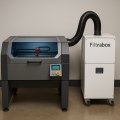
Issues such as misalignment, software errors, or connectivity problems can occur. If you encounter these challenges, refer back to the troubleshooting section of your user manual or online forums dedicated to laser engraving where experienced users share solutions. Safety precautions are paramount when operating a laser engraver. Always wear protective eyewear designed for laser use and ensure that your workspace is free from flammable materials. Understanding how to properly use ventilation systems or fume extractors will also help maintain a safe working environment. With these steps in mind, you'll be well on your way to successfully setting up your laser engraver and unleashing your creativity in this exciting field of engraving.
Common Applications for Beginners
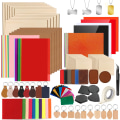
For those new to laser engraving, embarking on beginner-friendly projects is essential for building skills and gaining confidence.Here are a few ideas to get you started:Personalized Coasters: Create custom coasters from materials like wood or cork. Engraving simple designs or initials will allow you to practice precision and control.
Keychains:
Design unique keychains using acrylic or wood. This project is not only practical but also allows you to experiment with different shapes and sizes.Photo Engravings:
Convert photos into engravings on wood or metal. This project challenges your understanding of image processing and depth settings.Custom Signs:
Make personalized signs for your home or workspace.You can use various materials and fonts, providing an opportunity to explore layout and design.
Jewelry:
Try your hand at creating engraved jewelry pieces. This can include pendants or bracelets, allowing for creativity in both design and material choice. These projects will help beginners familiarize themselves with the laser engraver's capabilities while producing functional and decorative items.Software Installation and Configuration
To effectively operate a laser engraver, software installation and configuration are crucial steps that can significantly influence the quality of your engravings. The first step is to choose the right software that is compatible with your laser engraver model. Commonly used software includes LightBurn, CorelDRAW, and Adobe Illustrator.Each of these applications offers unique features tailored for design creation and machine operation. Once you have selected your preferred software, proceed with the installation process. This typically involves downloading the software from the official website or using an installation CD if provided. Follow the on-screen instructions to complete the installation. After installation, it is essential to configure the software settings to ensure optimal performance with your laser engraver. This includes setting up the correct communication ports, adjusting engraving parameters such as speed and power settings, and ensuring that the correct machine profile is selected within the software. Many laser engravers also come with their own dedicated software, which may simplify the setup process by integrating all necessary functions in one platform.
Ensure that you familiarize yourself with this software as it often contains specific features designed to work seamlessly with your machine. Lastly, always keep your software updated to benefit from the latest features and improvements. Regular updates can enhance compatibility and performance, making your engraving tasks more efficient.
Unboxing and Setting Up
Unboxing your new laser engraver can be an exciting experience, but it's essential to approach it with care. First, ensure you have a suitable location prepared for the machine.Laser engravers
can be quite large and require ample space for operation.Choose a sturdy table or workbench that can support the weight of the machine and provide enough room for material handling. When you open the box, you should find the main unit of the laser engraver, along with various components such as the power supply, cables, lenses, and any included software. Carefully remove each item and check them against the packing list provided by the manufacturer to ensure nothing is missing. Be cautious of sharp edges and parts that may be fragile. After unboxing, set up the engraver in your chosen location. Make sure the area is well-ventilated, as laser engraving can produce fumes depending on the materials used.
Position the machine near a power outlet and ensure that all cables can reach without strain. It's also advisable to have a fire extinguisher nearby, as a safety precaution. Once everything is in place, follow the manufacturer's instructions to connect the power supply and any necessary components. This may involve attaching cooling systems or exhaust fans if your model requires them. Double-check all connections and ensure that the machine is stable before moving on to the next setup steps. With your laser engraver unboxed and set up in a suitable location, you are now ready to proceed with further configurations to optimize performance and ensure safety during operation.
Preparing Your Designs
Creating or sourcing designs that are suitable for engraving is a crucial step in the process of setting up your laser engraver.The quality of your design directly impacts the final outcome of your engraving project.
Laser engravers
can work with various formats, but understanding which ones are best suited for your needs will save you time and enhance your results. First, consider using software designed for laser engraving. Programs like Adobe Illustrator, CorelDRAW, and Inkscape allow you to create vector graphics, which are ideal for engraving. Vector images are resolution-independent, meaning they can be scaled without losing quality, making them perfect for detailed designs. If you're not comfortable creating your own designs from scratch, there are numerous online resources where you can find pre-made designs.Websites like Etsy and design marketplaces offer a plethora of ready-to-use files tailored for laser engraving. Just ensure that the designs you choose are compatible with your machine's software. When preparing your designs, keep in mind the material you will be engraving on. Different materials may require different design specifications. For instance, if you are working with wood, you might want to avoid overly intricate designs that could lead to chipping or burning.
Conversely, metals often require more detailed engravings due to their durability. Finally, always test your designs before committing to a final product. Conducting test engravings on scrap materials will help you identify any adjustments needed in design size, depth, or speed settings on your laser engraver. This practice ensures that your final project meets your expectations and showcases the full potential of laser engraving.
Safety Precautions
When operating a laser engraver, safety should be your top priority. The powerful lasers used in these machines can pose significant risks if proper precautions are not taken.Here are some essential safety measures to keep in mind:1.
Wear Protective Eyewear
: Always use appropriate safety goggles designed for laser use. These goggles will protect your eyes from harmful laser beams and reflections.2.Ensure Proper Ventilation
: Laser engraving can produce harmful fumes and particles, especially when working with materials like plastic or wood. Always operate your laser engraver in a well-ventilated area or use an exhaust system to remove hazardous emissions.3.Keep Flammable Materials Away
: Maintain a clean workspace by removing any flammable materials from the vicinity of the laser engraver. This includes papers, cloths, and certain chemicals that could ignite.4.Use a Fire Extinguisher
: Have a fire extinguisher nearby that is rated for electrical fires.In case of an emergency, being prepared can help you respond quickly.5.
Read the Manual
: Familiarize yourself with the specific safety instructions provided by the manufacturer of your laser engraver. Each machine may have unique requirements and recommendations.6.Do Not Leave the Machine Unattended
: Always supervise the engraving process. If something goes wrong, it’s crucial to be present to take immediate action. By following these safety precautions, you can create a secure environment for using your laser engraver and enjoy the creative possibilities it offers while minimizing risks.Adjusting Settings for Different Materials
When it comes to laser engraving, adjusting the settings is crucial for achieving optimal results. Different materials require different settings in terms of power, speed, and focus.Here’s a guide to help you adjust your laser engraver settings based on the type of material you are working with.
Wood
: For engraving on wood, a moderate power setting (around 30-50%) combined with a slower speed (approximately 200-300 mm/s) usually yields excellent results. This allows the laser to penetrate the wood without burning it excessively. Always ensure that the focus is sharp for clean lines.Metal
: Engraving metal requires higher power settings, often between 70-100%. The speed should be relatively slow, around 100-150 mm/s, to ensure that the laser has enough time to etch into the surface.A precise focus is essential to avoid any unwanted markings.
Glass
: When working with glass, lower power settings (about 20-30%) are recommended, along with higher speeds (around 300-400 mm/s). This minimizes the risk of shattering while still achieving a beautiful engraving. A focused beam is crucial here as well to maintain clarity in the design.Acrylic
: For acrylic materials, a medium power setting (around 40-60%) combined with a fast speed (approximately 300-500 mm/s) can create smooth cuts and engravings. It’s important to keep the focus tight to achieve fine details without melting the edges. By understanding how to adjust these settings based on the material type, you can ensure your laser engraver operates efficiently and produces high-quality results every time.Choosing the Right Laser Engraver
When considering how to set up a laser engraver, one of the most critical steps is choosing the right laser engraver for your needs.Various factors play a significant role in this decision, including power, bed size, and compatibility with different materials.
Power
is an essential factor that affects both the speed and quality of the engraving process. Laser engravers are typically categorized by their wattage, with higher wattage machines capable of cutting through thicker materials and producing deeper engravings. For instance, a 40W laser may be suitable for engraving on soft materials like wood and acrylic, while a 100W laser could handle metals and thicker woods more efficiently. Understanding the power requirements based on your intended applications will help ensure you select a model that meets your project needs. The bed size of the laser engraver is another vital consideration.The bed size determines the maximum dimensions of the material you can work with at one time. If you plan to engrave larger items or multiple smaller pieces simultaneously, a machine with a larger bed will be beneficial. Conversely, if your projects are more compact, a smaller bed size might suffice and could be more cost-effective. Finally, consider the compatibility with materials. Different laser engravers excel with various substrates, so it is crucial to ensure the model you choose can handle the types of materials you intend to use.
Common materials for laser engraving include wood, acrylic, glass, and metals. Some machines may come with specialized features or settings tailored for specific materials, enhancing their functionality and ease of use. By evaluating these factors—power, bed size, and compatibility with materials—you can make an informed decision on which laser engraver is best suited for your engraving projects, ensuring high-quality results and efficient operation.
Troubleshooting Tips
Setting up a laser engraver can sometimes be a challenging process, and encountering issues is not uncommon. Here are some common setup problems along with effective solutions to help you get your laser engraver running smoothly.1.Misalignment of the Laser Beam:
If your engraver is not producing accurate engravings, the laser beam may be misaligned. To fix this, check the mirrors and lens for proper alignment.Adjust them according to the manufacturer’s guidelines, ensuring that the laser beam travels straight through all reflective surfaces.
2.Inconsistent Engraving Depth:
If you notice variations in engraving depth, the issue may stem from improper settings or material inconsistencies. Make sure to calibrate your laser power settings based on the material type and thickness. Conduct test engravings on a scrap piece before proceeding with the final project.3.Poor Material Adhesion:
Sometimes, materials may not adhere well to the bed of the engraver, leading to movement during the engraving process. To combat this, use clamps or double-sided tape to secure your material firmly in place.Additionally, ensure that the surface is clean and free from dust or debris.
4.Software Compatibility Issues:
If you're facing difficulties with software not recognizing your engraver, check for updates and ensure that your drivers are correctly installed. Consult the user manual for specific software requirements and troubleshooting steps.5.Overheating of Components:
Laser engravers can overheat during prolonged use, which can affect performance. Ensure that your machine has adequate ventilation and consider using a fan or cooling system if necessary. Regularly check for dust accumulation around fans and vents to maintain airflow. By addressing these common setup issues with these troubleshooting tips, you can enhance your experience and achieve optimal results with your laser engraver.Always refer to the manufacturer's instructions for specific guidance related to your model. In this article, we covered the essential steps for setting up a laser engraver, starting from choosing the right machine to adjusting settings for different materials. Remember that proper unboxing and initial setup are crucial for optimal performance. Additionally, software installation and configuration play a vital role in ensuring that your engraver operates smoothly. As you embark on your engraving journey, we encourage you to explore your creativity with various projects. Whether it’s personal crafts or professional applications, mastering the technique takes practice and experimentation.
Don’t be afraid to make mistakes, as they often lead to valuable learning experiences. For those interested in advancing their skills further, there are numerous resources available online. Consider seeking out tutorials or communities that focus on advanced engraving techniques and custom engraving services to expand your knowledge and capabilities. Don’t be afraid to make mistakes, as they often lead to valuable learning experiences. For those interested in advancing their skills further, there are numerous resources available online. Consider seeking out tutorials or communities that focus on advanced engraving techniques and custom engraving services to expand your knowledge and capabilities.